The Broadcast.log is generated every time a fax broadcast transmission is started, regardless of whether it was successful or not. At the start of the broadcast, all recipients in the group will be listed in the log. When a fax has been successfully sent to a recipient, their entry in the Broadcast.log will be automatically deleted and then entered in the Success.log. At the end of the broadcast, the Broadcast.log will only contain the unsuccessful fax attempts.
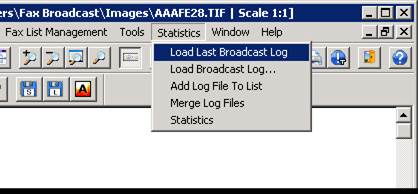
The Broadcast.log can be edited for failed faxes such as “The remote station is BUSY” or “No Answer” with a Notepad or text editor for resending. The Broadcast.log can be loaded in the Impact Fax Broadcast > Statistics > Load Last Broadcast Log or Load Broadcast Log menu items.
The loaded broadcast log should appear as the following screen capture:
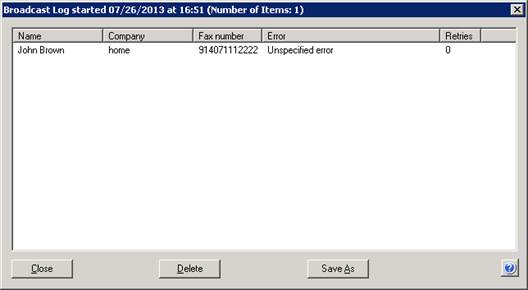
The top part of the window will display the date and time that the fax broadcast was started as well as the total number of items in the list (useful for long lists).
You can sort the items by clicking the header button of each column.
The items can be selected (more than one at a time) and deleted by pressing the Delete button. To save the edited results, press the Save As button.