The IceViewer HTML5 Content-Engine comes with Events, allowing developers to subscribe to a set of IceViewer HTML5 events. The available Events are described in the IContentEngineEventHandler in the Content-Engine Source Code.
The available events are the followings:
|
Event |
Action |
|
DocumentContentRequestEvent |
This event is triggered, when a document is requested through IceViewer HTML5. |
|
SaveEvent |
This event is triggered, when a document is requested to be saved through IceViewer HTML5. |
|
PrintEvent |
This event is triggered, when a document is requested to be printed through IceViewer HTML5. |
|
DownloadEvent |
This event is triggered, when a document is requested to download through IceViewer HTML5. |
|
UploadEvent |
This event is triggered, when new document is uploaded to IceViewer HTML5. |
|
DeleteEvent |
This event is triggered, when a document is requested to be deleted through IceViewer HTML5. |
Implementing event handlers is optional for developers when they create a customized Content-Engine. The IceViewer HTML5 has a built-in implementation for each Event, and it’s not mandatory to override the implementation.
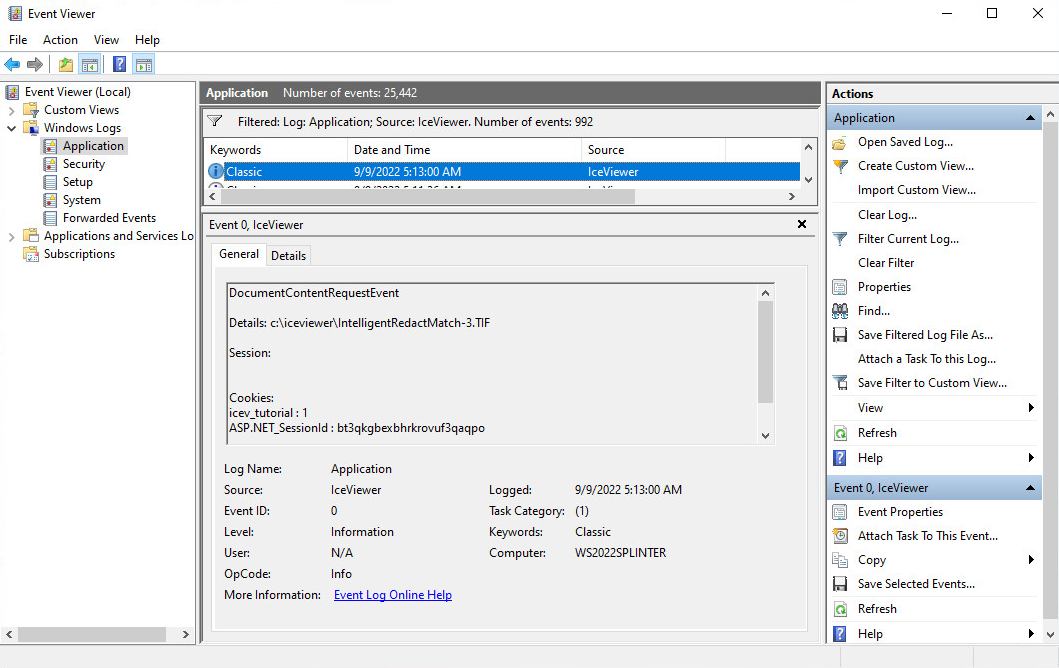
For audit purposes, the Events will write into the Windows Event Viewer, whenever the an event is triggered, allowing Administrators to track which documents have been accessed, printed, deleted, etc.
The Event Viewer entry will be generated into the Windows Logs / Application node and will contain the SESSION and COOKIE information to let Administrators identify the session or user who initiated the action.