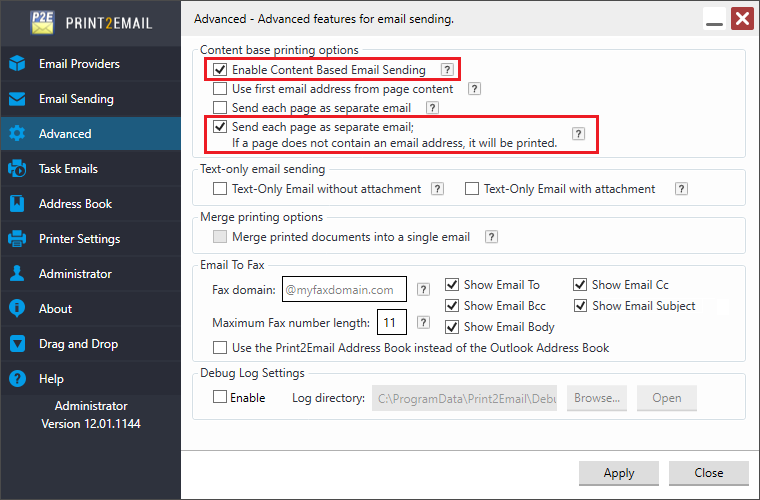
You can send each page of a printed document as a separate email, with different recipients, subjects, and email bodies, by enabling Send each page as separate email along with Enable Content-Based Email Sending.
Alternatively, you can use Send each page as separate email with Use first email address from page content to send pages to different recipients. If Content-Based Email Sending is also enabled, multiple command sequences in the document will be recognized in addition to the email address.
Note: The Send each page as separate email option can only be used if Enable Content-Based Email Sending or Use first email address from page content is enabled.
When Enable Content-Based Email Sending and Send each page as separate email are enabled, printing a multi-page document to Print2Email will extract the recipients, subject, and email body from each page, sending every page as a separate email attachment.
NOTE: The “Use first email address from page content” feature must be disabled / unchecked when using "Enable Content Base Email Sending".
From Print2Email version 10.30, if the Print2Email find a page without a recipient, it will merge the page to the previous page until the next email recipient tag or the end of the document is found.
When the user prints a multi-page document that contains email addresses on different pages, the user will be able to send pages separately as an email.
If the “Enable Content Base Email sending” and “Send each page as a separate email” is enabled the Print2Email will send the email as in the following example:
The user prints a 9 page document. The document contains 3 email addresses with the content-based tag.
There is an email address on the 1st, 3rd and on page 7th. Pages 2,4,5,6,8 do not contain any content-based email tag (NO email address).
The Print2Email will send page 1-2 as one email, page 3-4-5-6 sent as second email and page 7-8-9 sent as third email.
The content base “EmailTo” tag will last until the next “EmailTo” tag is found in the following pages of the document. (ONE CAN NOT have more than one “EmailTo” tag on a page).
Example 1:
The following “EmailTo” tag is embedded in the printed document (7 pages):
On page 1: ##~~EmailTo=john.smith@blackice.com~~
On page 2: ##~~EmailTo=john.smith@blackice.com~~
On page 3: ##~~EmailTo=john.smith@blackice.com~~
On page 4: ##~~EmailTo=john.smith@blackice.com~~
On page 5: ##~~EmailTo=jane.doe@gmail.com~~
On page 6: ##~~EmailTo=jane.doe@gmail.com~~
On page 7: ##~~EmailTo=joe.blow@yahoo.com~~
When printing to the Print2Email, the Print2Email will send the following emails:
One email to john.smith@blackice.com which includes pages 1, 2, 3, and 4 from the printed document.
One email to jane.doe@gmail.com which includes pages 5, and 6 from the printed document.
One email to joe.blow@yahoo.com which includes page 7 from the printed document.
Example 2:
The following “EmailTo” tag is embedded in the printed document (7 pages):
On page 1: ##~~EmailTo=john.smith@domain.com~~
On page 2: (No Email)
On page 3: (No Email)
On page 4: (No Email)
On page 5: ##~~EmailTo=jane.doe@gmail.com~~
On page 6: (No Email)
On page 7: ##~~EmailTo=joe.blow@yahoo.com~~
When printing to the Print2Email, the Print2Email will send the following emails:
One email to john.smith@domain.com which includes pages 1, 2, 3, and 4 from the printed document.
One email to jane.doe@gmail.com which includes pages 5, and 6 from the printed document.
One email to joe.blow@yahoo.com which includes page 7 from the printed document.
Example 3:
The following “EmailTo” tag is embedded in the printed document (7 pages):
On page 1: ##~~EmailTo=john.smith@blackice.com~~
On page 2: ##~~EmailTo=bradley.butler@yahoo.com~~
On page 3: ##~~EmailTo=vincent.poole@gmail.com~~
On page 4: ##~~EmailTo=clara.weber@aol.com~~
On page 5: ##~~EmailTo=patsy.ramsey@webmail.com~~
On page 6: ##~~EmailTo=edgar.hart@outlook.com~~
On page 7: ##~~EmailTo=penny.hampton@icloud.com~~
When printing to the Print2Email, the Print2Email will send the following emails:
One email to john.smith@blackice.com which includes page 1 from the printed document.
One email to bradley.butler@yahoo.com which includes page 2 from the printed document.
One email to vincent.poole@gmail.com which includes page 3 from the printed document.
One email to clara.weber@aol.com which includes page 4 from the printed document.
One email to patsy.ramsey@webmail.com which includes page 5 from the printed document.
One email to edgar.hart@outlook.com which includes page 6 from the printed document.
One email to penny.hampton@icloud.com which includes page 7 from the printed document.