When opening a file using the TIFF Viewer Chrome / Edge extension, you’ll receive an “Error code 1: Access to the native messaging host was disabled by the system administrator.” message, if the Native Messaging is disabled on the computer by Group Policy.
The TIFF Viewer Chrome / Edge extension is using Native Messaging technology to comminucate with a background application. Native Messaging is an essential component for the TIFF Viewer Chrome / Edge extension, therefore Native Messaging must be enabled on the computer.
To enable Native Messaging in the Group Policy, please follow the instructions below:
For Google Chrome
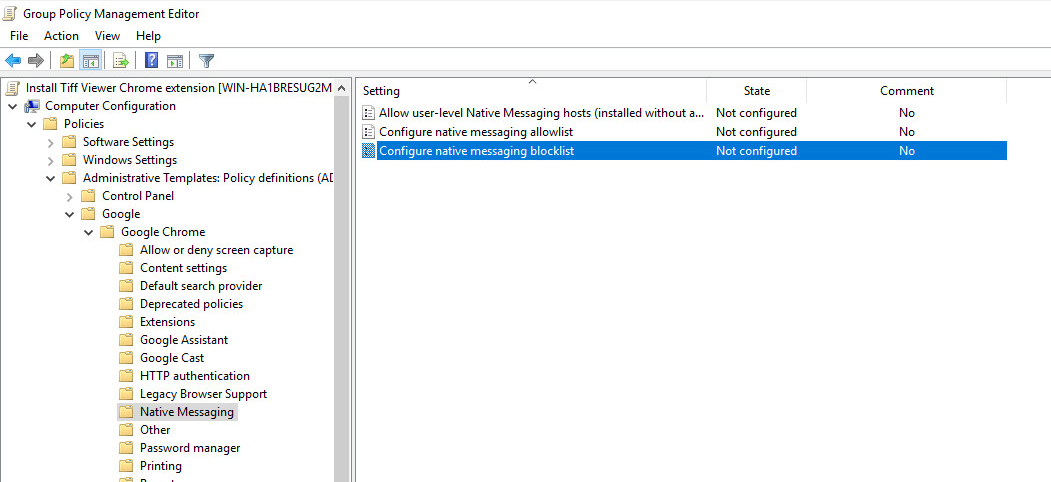
Go to Policies > Administrative Templates > Google Chrome > Native Messaging and double click on the Configure native messaging blocklist policy.
For Microsoft Edge
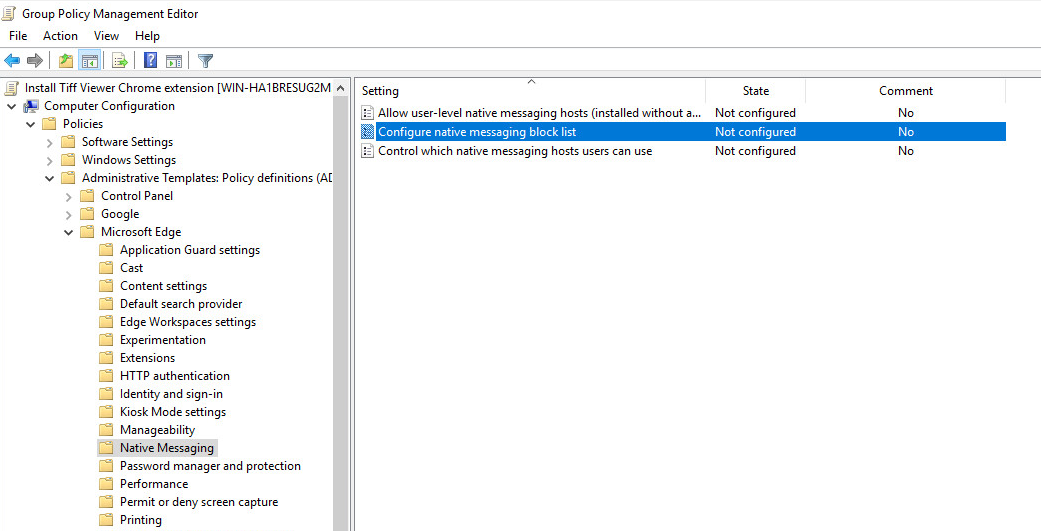
Go to Policies > Administrative Templates > Microsoft Edge > Native Messaging and double click on the Configure native messaging blocklist policy.
Change the policy to Disabled, to allow the Native Messaging on the domain computers.

If you would like to individually block Native Messaging for application, please make sure that the TIFF Viewer Chrome / Edge extension native host is excluded from the list:
com.blackice.tiffviewer.native