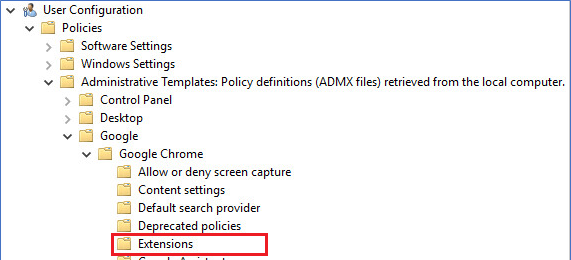
To install the TIFF Viewer Chrome extension using Group Policy, Administrators must use the ExtensionInstallForceList policy.
Create new GPO object and navigate to the Policies -> Administrative Templates -> Google -> Google Chrome -> Extensions:
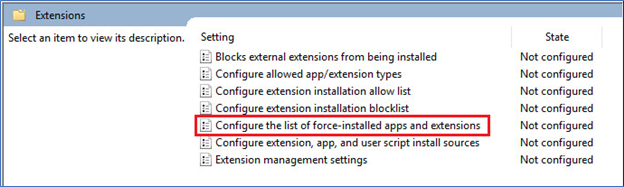
Double-click on the “Configure the list of force-installed apps and extensions” option:
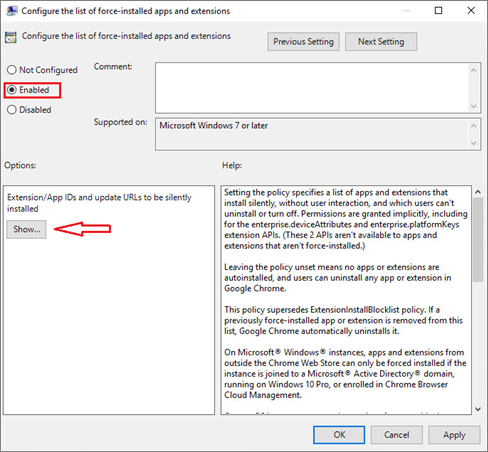
Select the Enabled option and click on the Show… option:
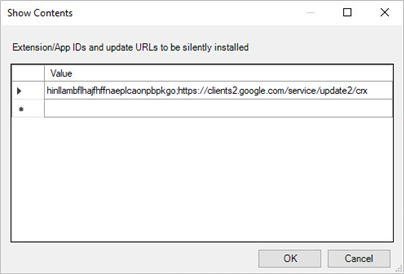
Add the following entry: hinllambflhajfhffnaeplcaonpbpkgo;https://clients2.google.com/service/update2/crx
NOTE: To install the Tiff Viewer Chrome extension, active internet connection is required on the client computer.