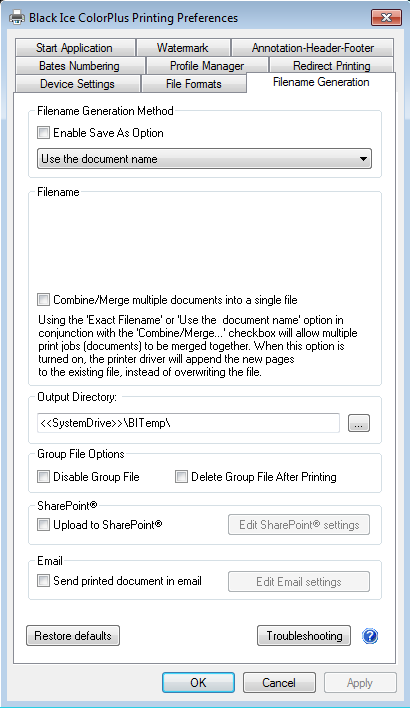
This section covers information about how to configure the system drive for the output folder during installation in the RTK InstallShield Sample by using system environment variables.
Firstly, create an output folder on the system drive to convert the documents into. In this example, the output folder will be BiTemp. Consequently the output folder can be references as %SystemDrive%\BITemp
Secondly, modify the InstallShield sample in the RTK/API:
//---------------------------change
Dlg_SdSelectDestFolder:
GetEnvVar( "TEMP", G_OutputDir );
LongPathFromShortPath(G_OutputDir);
szTitle = "Choose output folder for the printer";
szMsg = "Choose a folder where the printed files will be generated:";
nResult = SdAskDestPath( szTitle, szMsg, G_OutputDir, 0 );
if (nResult = BACK) goto Dlg_SdSelectFolder;
//---------------------------change to
Dlg_SdSelectDestFolder:
GetEnvVar( "TEMP", G_OutputDir );
LongPathFromShortPath(G_OutputDir);
szTitle = "Choose output folder for the printer";
szMsg = "Choose a folder where the printed files will be generated:";
nResult = AskPath( szTitle, szMsg, G_OutputDir);
if (nResult = BACK) goto Dlg_SdSelectFolder;
Start the installer and insert <<SystemDrive>>\BITemp on the Choose Destination Location dialog.
Do not use the "Browse…" button.
At the end of the installation, export the settings into INI file. For more information about how to generate INI file at the end of the installation, please refer to the INI file generation for OEM installer.
In the next step, modify the installScript as the following:
//---------------------------change
prototype BlackIceDEVMODE.SaveBlackIceDEVMODEA(BYVAL STRING, BYVAL LONG);
prototype BlackIceDEVMODE.DisableInternetTiffFormat(BYVAL LONG);
//---------------------------change to
prototype BlackIceDEVMODE.SaveBlackIceDEVMODEA(BYVAL STRING, BYVAL LONG);
prototype BlackIceDEVMODE.DisableInternetTiffFormat(BYVAL LONG);
prototype BlackIceDEVMODE.ExportSettingstoINIFileA(BYVAL LONG, BYVAL STRING);
prototype BlackIceDEVMODE.ReleaseBlackIceDEVMODE(BYVAL LONG);
Also modify the following:
//---------------------------change
nResult = BlackIceDEVMODE.SaveBlackIceDEVMODEA(@PRINTER_NAME, tmpLong);
if (nResult == 0) then
Message("SaveBlackIceDEVMODE failed!", SEVERE);
exit;
endif;
//---------------------------change to
nResult = BlackIceDEVMODE.SaveBlackIceDEVMODEA(@PRINTER_NAME, tmpLong);
if (nResult == 0) then
Message("SaveBlackIceDEVMODE failed!", SEVERE);
exit;
endif;
BlackIceDEVMODE.ExportSettingstoINIFileA(tmpLong, G_DriverDir ^ "3" ^ @DRIVER_CONFIG_INI);
BlackIceDEVMODE.ExportSettingstoINIFileA(tmpLong, G_DriverDir ^ @DRIVER_CONFIG_INI);
BlackIceDEVMODE.ReleaseBlackIceDEVMODE(tmpLong);
After installing printer driver check the Printing preferences. The Output Directory should use the <<SystemDrive>> environment variable.