The default Photo Quality (dithering) settings in the Black Ice Printer Driver provide good balance between file size and quality for average documents mainly consisting of black text on white background with a few images here and there.
When printing documents with very small fonts or gray text for archiving or faxing, the default dithering settings might not produce legible results.
5 point gray text printed with the default dithering settings:
204x196 DPI, Floyd-Steinberg Low Quality, Intensity: 100
(Page size using TIFF Group 4 compression: 18 948 bytes)
When turning on the Create Faxable Image option, the Printer Driver will automatically change the dithering settings to make small gray text more legible:
204x196 DPI Fine Fax Compatibility, Floyd-Steinberg High Quality, Intensity: 50
(Page size using TIFF Group 4 compression: 23 958 bytes)

Some applications cannot print documents correctly if the vertical and horizontal resolutions do not match. When the 204x196 DPI Fine Fax Compatibility option is turned on, the Printer Driver will be set to the same horizontal and vertical resolution (200x200 DPI), so the application will not have any issues printing. The Printer Driver receives the page content from the application in 200x200 DPI, and then scales it to 204x196 DPI before writing it to a file.
204x196 DPI Fine Fax, Floyd-Steinberg High Quality, Intensity: 50
(Page size using TIFF Group 4 compression: 24 014 bytes)
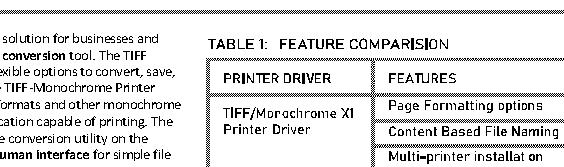
The 204x196 DPI Fine Fax Downscaled option can be used to make small text bolder in the document. When the 204x196 DPI Fine Fax Downscaled option is selected, the Printer Driver receives the page content from the application in 600x600 DPI, and then scales it to 204x196 DPI before writing it to a file.
204x196 DPI Fine Fax Downscaled, Floyd-Steinberg High Quality, Intensity: 50
(Page size using TIFF Group 4 compression: 22 618 bytes)
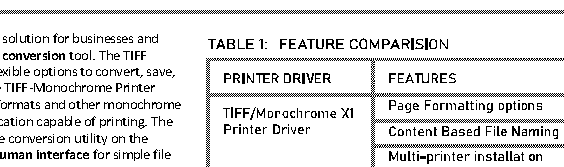
The Photo Quality (dithering) options can be fine tuned on the File Formats tab in the Printing Preferences of the Printer Driver. Choosing a higher quality dithering can cause an increase in file size because higher quality dithering algorithms are fine grained and produce a large amount of small dots on the image which can be difficult to compress. When the priority is on small file size and preserving gray objects in the document is not required, the Threshold option can be used. When the Threshold option is selected, the document is not dithered, pixels darker than 50% gray are converted to black, the rest of the pixels are converted to white.
204x196 DPI Fine Fax Compatibility, Threshold, Intensity: 50
(Page size using TIFF Group 4 compression: 9 288 bytes)
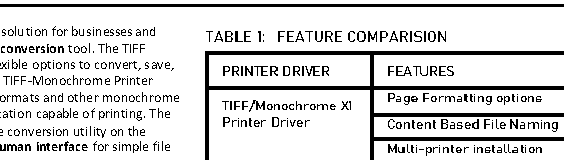
When using the Threshold option, care should be taken that none of the gray elements in the document become invisible. If the text on the page is too light, the printer driver might turn it white instead of black, making it invisible. In this case, the Intensity option should be lowered, to make the text darker. When printing black text on gray background, the background may become black. In this case, the Intensity value should be increased, to make the background lighter.
|
Original
|
Threshold, Intensity: 30
|
Threshold, Intensity: 100
|
Threshold, Intensity: 120
|
|
|
|
|
|
How much the chosen dithering affects the file size depends on the document, the more gray or colorful elements are on the page the larger the difference between the algorithms.
· Threshold option produces the smallest file size
· The Floyd-Steinberg low-quality and Jarvis-Judice-Ninke low-quality options provide low file size, low quality dithering for images, but increase the contrast of the document which can be useful for text legibility.
· The Floyd-Steinberg high-quality, Jarvis-Judice-Ninke high-quality Sharp, Smooth and Stucki options produce better image quality but produce a larger file size.
· The Ordered Clustered dithering produces small file size, but low quality. It is a coarse dithering, not recommended for low resolutions.
· The Disable Photo Quality option uses the default Windows GDI dithering algorithm. The image is directly rendered to a monochrome bitmap, so it requires less memory than the other dithering types. Useful for extremely large images, but not recommended for faxing. The Intensity value cannot be set when using GDI dithering.
Turning off the Create Faxable Image option restores the Photo Quality options that were used before turning on the Create Faxable Image option.