
Selecting pages to print
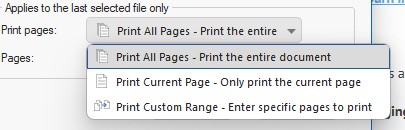
- Print All Pages – Print the entire document
Prints every page of the selected document.
Use this option when you want to print the complete document without excluding any pages.
-
Print Current Page – Only print the current page
Prints only the page currently displayed in IceViewer.
Use this option when you need a single page from a document rather than the entire file.
-
Print Custom Range – Enter specific pages to print
The IceViewer will print specified pages or page ranges entered to the Pages field. Type page numbers and/or page ranges separated by commas counting from the start of the document. For a range of pages, one can use a hyphen.