
Monitoring printing progress
When printing begins, IceViewer displays a progress window showing the current printing status.
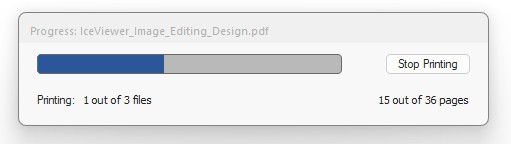
The progress window includes:
- Progress: The name of the document currently being printed.
- Progress bar: A visual indication of printing progress.
- Printing: The current file number and the total number of files in the batch.
- Pages: The number of pages processed and the total number of pages in the batch.
For example, the progress window may display Printing: 1 out of 3 files and 15 out of 36 pages.
Furthermore, the printing progress of each document is updated in the document listing’s State column.
These indicators help you track the overall progress of the batch print job.