
Scaling
The Scaling dropdown menu allows you to control how the document's pages are sized to fit the selected paper size. You can automatically fit the content to the paper, stretch it to fill the page, or specify a custom scale.
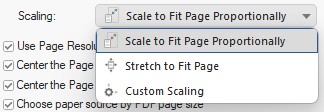
- Scale to Fit Page Proportionally
- Scales the image to fit the page.
- Stretch to Fit Page
- Stretches the image to fill the page.
- Custom Scaling
The Custom Scaling option allows users to proportionally scale the printed document or image on the selected paper size.